Key takeaways
- Separate everyday offices, hosted events and VR workshops.
- Check current availability; Pragli/Pesto and Tandem are historical entries.
- Test joining, conversation controls and outcomes before committing.
Revisit the shortlist before choosing a tool
A virtual office, an online event venue and a VR meeting room solve different problems. A useful comparison starts with the activity your team needs to perform, the devices people have and the way conversations should begin and end.
This guide revisits all eleven names in our original selection using publisher and founder sources checked on 27 September 2026. It is a sourced overview, not a hands-on ranking. Historical review scores, prices and unsupported pros-and-cons claims have been removed. Pragli/Pesto and Tandem are retained as historical entries because their founders report that the services were discontinued.
Separate everyday presence, events and immersive work
For everyday collaboration, you may want to see who is available and join a conversation. An event needs a different set of controls: participant arrival, movement between groups and a host’s presentation. A VR workshop adds hardware, navigation and comfort requirements.
Use these three questions to decide which category deserves a trial. Some products cover more than one category; a category is not a quality rating.
Which interaction needs a space?
- Everyday office
Find a colleague, start a conversation and return to focused work.
- Hosted event
Welcome attendees, move between groups and manage a presentation.
- Immersive workshop
Work in a VR environment with suitable devices and an alternative route.
Kumospace: conversations in a shared space
Kumospace presents a virtual workspace with spatial audio, movement around the space and shared links or documents. This makes conversation boundaries an important part of a demonstration.
Try two simultaneous discussions with your actual devices. Check who can hear whom, how to join or leave and how someone signals that they need uninterrupted time. Evaluate those actions rather than assuming that a virtual floor will automatically improve collaboration.
Gather: a virtual office for distributed teams
Gather describes its workspace around spontaneous conversations, meetings and team connection. Its current site links to a newer application and help resources, so ask which product version the demonstration and documentation cover.
Test a colleague’s arrival, a short conversation and a move back to focused work. Confirm how guests and less frequent users find the right people. The experience should make sense to someone who did not help design the space.
Sococo: a map with rooms and availability
Sococo’s FAQ describes an office map, rooms, availability indicators and audio/video conversations. It also describes guest invitations and room-entry controls.
Use the trial to check those controls with an internal colleague and a guest. Review the current browser and device requirements directly: a long-standing feature page is not enough to confirm every integration or platform version you use today.
Teemyco: persistent rooms and team context
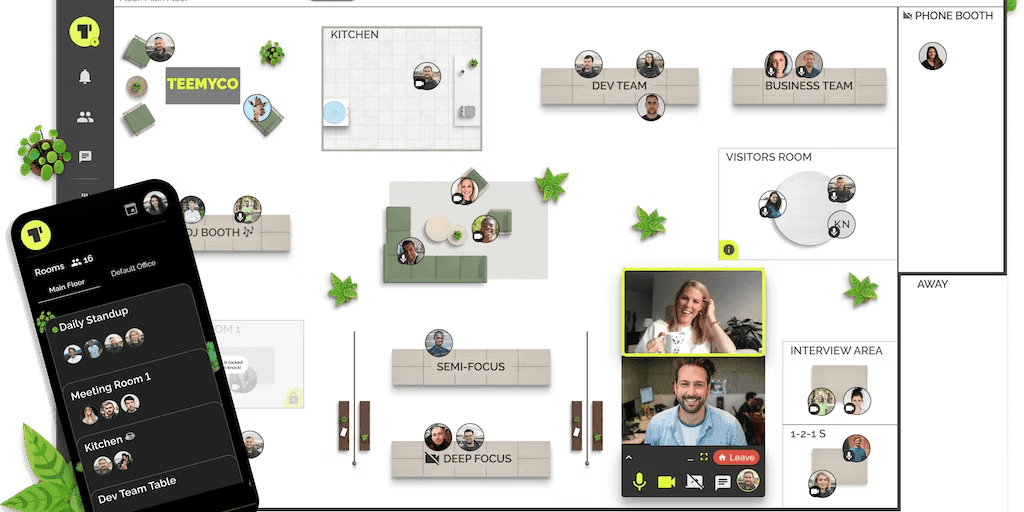
Teemyco presents a persistent virtual office, availability, drop-in conversations and room-based collaboration. The historical illustration shows the idea of distinct areas; it is not a capture of the current product.
Ask how the proposed room layout fits your team’s actual work. Check who can enter, which information remains in a room and how notifications behave. Treat the publisher’s productivity percentages as claims to investigate, not expected results for your organisation.
Teamflow: confirm the offer before a shortlist decision
Teamflow’s public site still describes a virtual office with whiteboards, shared screens and documents or apps within meetings. That page supports the product description, but does not establish current onboarding, support or service continuity.
Before investing in a trial or migration, obtain a current demonstration and confirmation of availability from the provider. The original claim about automating repetitive workflows is not carried forward: embedding collaboration tools is a different capability.
Remo: an event and networking format
Remo positions its platform around virtual events, conferences and networking, including movement between tables. Compare it against an event brief rather than assuming it serves the same purpose as an everyday office.
Rehearse arrival, a small-group discussion and the transition to a presentation. Check the host’s controls and the experience of a first-time attendee. Confirm the current event limits and plan directly instead of relying on old per-user comparisons.
Huddle: conferencing, chat and calling
Huddle.Team is the service matching the original guide’s virtual-phone description. Its public offer centres on audio/video meetings, chat, screen sharing and calling. This is a different category from navigating a persistent spatial office.
Test the communication workflow you need and verify calling availability for your locations. Do not confuse this product with similarly named collaboration services, or carry forward the original unsupported claim about custom virtual-room layouts.
Glue: immersive spaces for meetings and events
Glue describes a VR platform for meetings, events, training and custom environments. It should not be labelled simply as another 2D office.
Start with a task that benefits from an immersive environment. Ask the provider to show supported devices, participant onboarding and the route for anyone unable to use a headset. Include setup effort and facilitation in the evaluation, not just the appearance of the room.
MeetinVR: workshops and collaboration in VR
MeetinVR presents VR meetings, workshops, reviews and custom spaces. Its examples include sketching and 3D collaboration, which call for a specific workshop scenario.
Try the actual task with representative participants and confirm how its outputs can be used afterwards. Check equipment compatibility, accessibility and a suitable alternative for participants who cannot use the proposed format. A compelling demonstration does not establish suitability for every recurring meeting.
Pragli/Pesto: a historical entry
Co-founder Doug Safreno’s account states that Pragli was renamed Pesto in 2021, discontinued in 2022 and followed by a pivot to Gentrace. It should therefore not appear as an available virtual-office recommendation in this revised guide.
The name remains here to explain the change for readers of the original selection. Gentrace is not presented as a replacement virtual office.
Tandem: a historical entry
Founder Rajiv Ayyangar’s public post refers explicitly to shutting down Tandem. The virtual-office service is therefore excluded from the current shortlist.
A surviving website title or old product description would not overturn that first-person statement. This entry concerns the remote-team product, not unrelated services using the Tandem name.
Run a trial with an exit decision
Select one recurring use case and a small group representing different devices and working conditions. Establish what would justify keeping the tool: an understandable joining process, suitable conversation controls and a usable record of the outcome. Include interruption and setup costs in the discussion.
A trial that leads to a decision
- Join
Can a new participant enter with the devices and permissions they have?
- Work
Can the group complete one real task without unnecessary interruptions?
- Keep or stop
Review the outcome, ongoing effort and how to export or leave.
Keep physical workplace coordination separate
A virtual conversation space does not tell you which physical desks are available or when a team plans to meet on site. Those are the questions addressed by FLYDESK hybrid scheduling and desk booking.
Compare the categories in our hybrid workplace software guide, or request a FLYDESK demonstration for the physical workplace part of your plan. No integration with the virtual-space products listed here is implied.